EINBLIQ.IO / Resources
CMCD v2: The state of open streaming analytics
A streaming service can look healthy overall while a particular app or delivery path repeatedly fails. To investigate, you have to find the affected sessions and work back through what happened before playback deteriorated, often with a different question from the one you started with.
That is why we favour keeping full-fidelity data: the request and event detail each source supplies across all observable sessions, with gaps in coverage made explicit. Small or uneven samples can miss rare failures or misrepresent affected groups. Keeping the detail gives you room to follow an unexpected lead later, when you know more about what to look for.
Two reporting paths
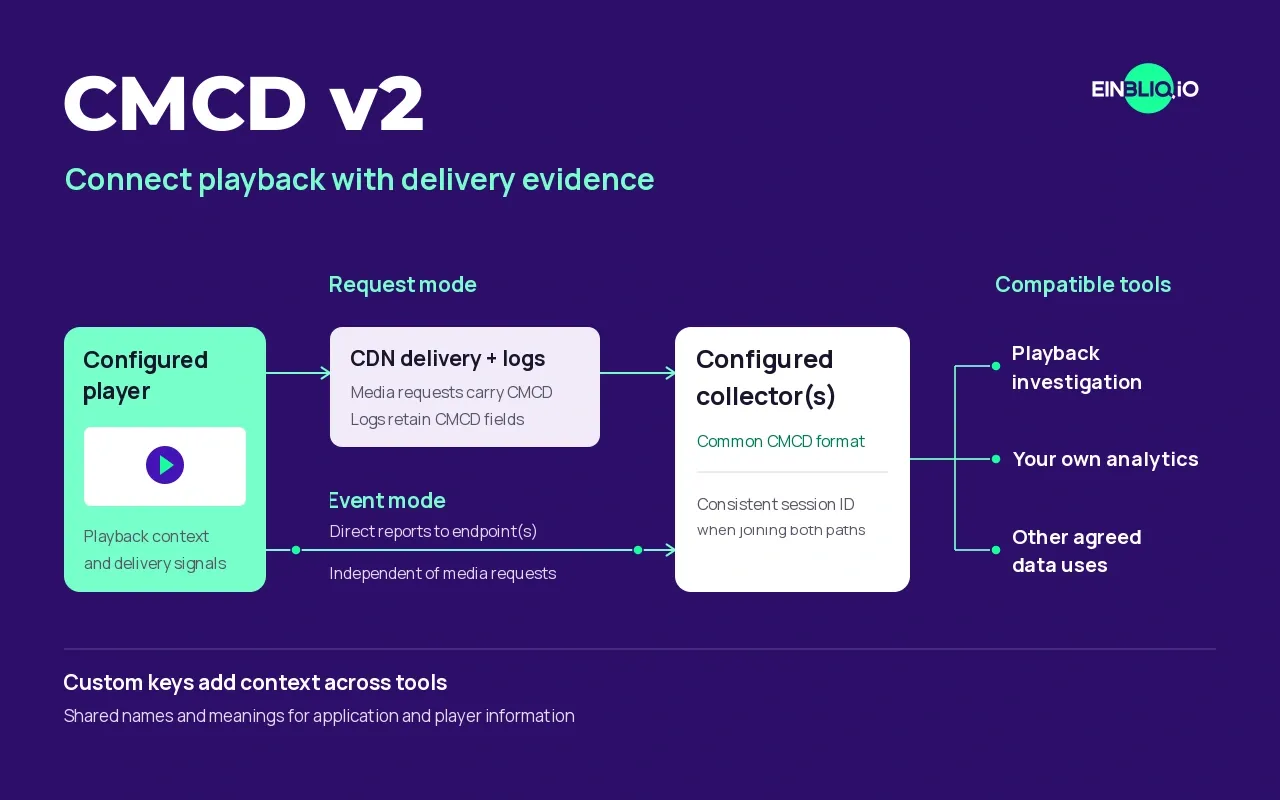
Common Media Client Data (CMCD) v2 expands standardised player reporting with playback states, startup delay, stall durations and error codes. The reports can take two complementary routes.
Request mode attaches player context to media requests, so an investigation can examine it alongside delivery records if the CDN logs retain those fields. This works with v1 as well as v2. The optional event mode sends reports independently to configured endpoints, including third-party collectors. Both modes can run together, joined through a consistent playback session ID.
Where the player supports the required reporting, these signals can be collected without a separate proprietary analytics SDK. There is still configuration and validation to do. With access to the underlying data, operators can also combine compatible analytics tools that use the common format.
What a probe might miss at an ad break
Suppose playback stalls as an ad starts on a particular smart-TV app. The probe is playing the same channel without trouble, but is it seeing the same ad? With dynamic ad insertion (DAI), viewers can receive different ads, sometimes from different delivery sources. A different client may also handle the transition differently. A successful probe run may never exercise the combination that failed for that viewer.
CMCD v2 helps investigate this transition through ad-break and ad start/end events, content IDs and playback state, where the player integration supplies them. Its non-rendered-content flag helps distinguish background loading from active playback. Joined with delivery records, these signals can help explain a stall even when the segments returned HTTP 200 but arrived too late.
Probes remain useful, especially for repeatable checks, testing suspected causes and checking a stream when nobody is watching. Viewer sessions show how a problem is distributed across the observed audience; a probe covers the clients, locations and scenarios it tests.
Custom keys can add app or player versions. The informal SVTA Custom Keys Registry helps establish shared meanings. We would welcome a shared key identifying synthetic sessions, so probe results could be correlated with viewer incidents without counting them in viewer KPIs. An unlabelled session would remain unclassified.
Using reports while the session is still running
Event mode removes the dependency on CDN-log forwarding. With suitable triggers and a sufficiently fast reporting pipeline, it supports near-real-time analysis and could feed multi-CDN content steering. How quickly that happens depends on reporting intervals, batching and processing. A connected control system still makes the delivery decisions.
Player support in November 2026
Our own contribution to this round of implementations is in dash.js 5.3.0. The release adds configurable custom keys and improves error reporting, startup delay and time-to-first-byte measurements. EINBLIQ.IO's Sebastian Siepe contributed the custom-key support and fixes for startup delay and timing measurements. The CMCD configuration supports request reporting and event targets.
Two other web-player options are worth evaluating for the fields your service needs:
- hls.js introduced v2 in 1.7.0, including event targets and custom data, with explicit limits on feature coverage.
- Shaka Player exposes v2 and event targets; its configuration remains labelled experimental.
Start with a mixed setup
Waiting for every platform to support v2 would hold up work you can already begin. Start with suitable CDN logs and the sessions they let you reconstruct, include CMCD v1 where available, then add v2 on a platform you can release and validate readily. The web players above provide a starting point. On Android, check the chosen player separately: Media3 documents request-based CMCD, while its v2 feature request remains open.
At EINBLIQ.IO, we contribute to CMCD v2 and the custom-key registry. SPECTRA connects suitable logs with available player reports and makes detailed data available for agreed customer uses. Our CMCD v2 demo write-up describes earlier showcases.
For a first evaluation, compare the v2 reports from that platform with your existing analytics. The comparison can guide where standards-based reporting complements or replaces SDK-based collection as coverage expands. CDN logs, v1 and v2 can coexist throughout that rollout.