Common Media Client Data (CMCD): v1 and v2 explained
Common Media Client Data (CMCD) is an open standard for a media player to report playback context to delivery and analytics systems. It gives those systems a shared vocabulary for information such as buffer level, bitrate and session identity. The standard is developed through CTA WAVE and SVTA; the published specification is CTA-5004-B.
For a streaming operations team, the useful connection is between the player's experience and the requests that delivered the content. A segment can return HTTP 200 and still arrive too late to prevent a stall. Investigating that case requires playback context alongside the delivery record.
How CMCD reporting works
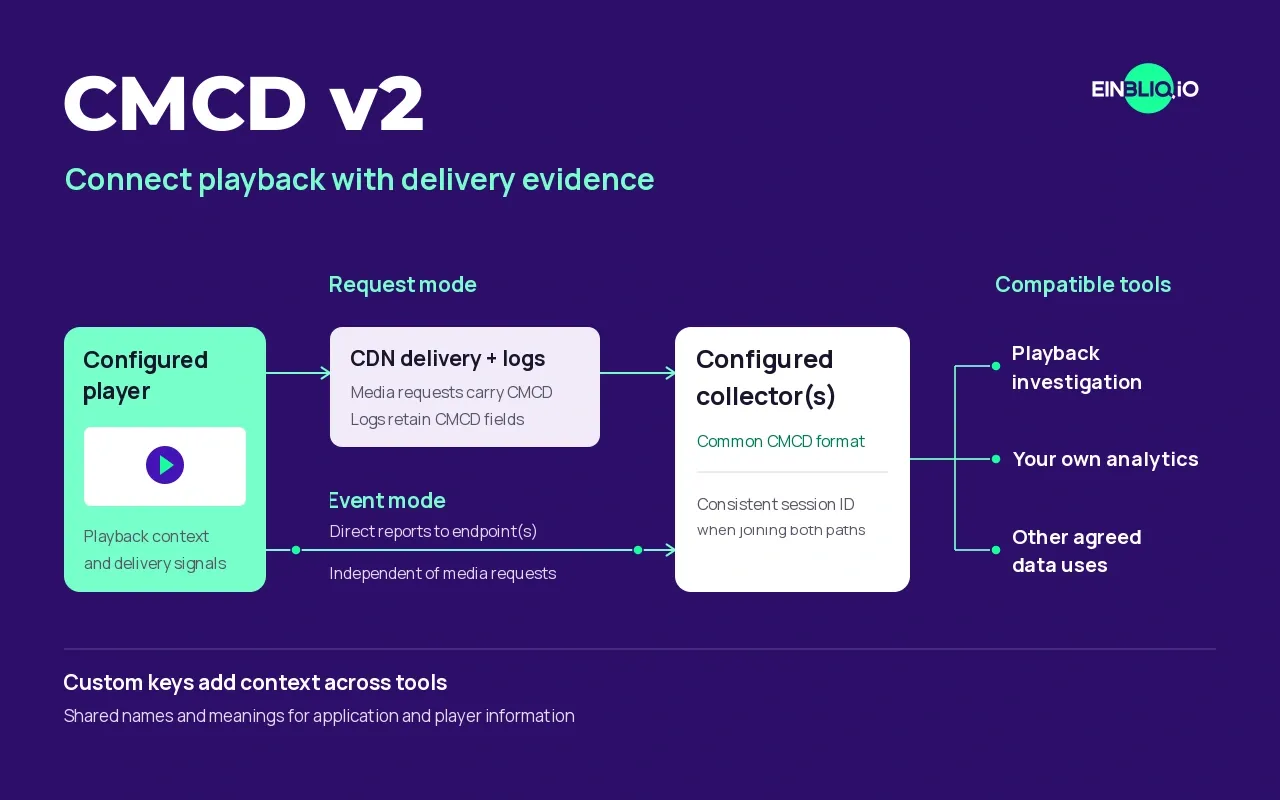
Request Mode attaches CMCD to media requests using a query parameter or HTTP headers. The CDN must retain that data in its exported logs for downstream analysis.
Event Mode, introduced in v2, sends reports independently to configured endpoints. It uses HTTP POST with Content-Type: application/cmcd, carrying UTF-8 CMCD records separated by line feeds. Reports can follow playback events or a configured interval.
Both paths can run together. Use a consistent per-playback session ID (sid) to connect them, with the same content ID (cid) for the content being reported. Request Mode requires a media request; Event Mode can report while no media request is being made, provided the player remains active and can reach the collector. CTA-5004-B defines both reporting modes.
For an EINBLIQ.IO integration, these paths connect to SPECTRA as follows:
CMCD v1 or v2 request mode
- Compatible player
- Media request + CMCD
- CDN request logs
- SPECTRA
CDN logs retain the client context alongside the delivery record.
CMCD v2 event mode
- Compatible player
- SPECTRA CMCD v2 endpoint
- SPECTRA
Configured response events, playback events and heartbeats arrive directly.
Connected session context for FOCUS investigations
CMCD v1 and v2
CMCD v1 supplies request-based context such as bitrate, buffer length and buffer starvation. v2 retains Request Mode, adds Event Mode and extends the fields for playback state, errors, startup, stalls and ad-related reporting. The April 2026 revision CTA-5004-B specifies application/cmcd for POST bodies, replacing the earlier text/cmcd value.
The version supported by a player does not establish that it emits every field. Check the implementation and the reports your application actually sends.
| Reporting option | Data path | What to check |
|---|---|---|
| v1 Request Mode | Player context travels with media requests | Player support and retained CDN log fields |
| v2 Request Mode | Richer player context travels with media requests | Implemented fields; reports depend on subsequent requests |
| v2 Event Mode | Optional reports go directly to configured endpoints | Supported events, reachability and session correlation |
Player support and configuration
The player setup guide records versions, maturity and configuration examples for hls.js, dash.js, Shaka Player, Media3/ExoPlayer, Apple AVPlayer and Roku. Its support assessment is dated 11 November 2026 and is based on documentation and source review, without conformance testing.
For example, hls.js documents CMCD configuration, including session and content IDs. Media3's CMCD guide describes opt-in request reporting, with headers as its default and query parameters as an option. Defaults and capabilities differ across platforms, so use the settings for your chosen player.
Enabling a reporting flag is the beginning of validation. Check a real playback session, the CDN log output and any direct event reports together. A configured field that never reaches the collector cannot support an investigation.
What to check in the delivery path
For EINBLIQ.IO integrations, we recommend query-based CMCD wherever the player offers it because CDN logs do not consistently retain custom headers. Header-only players need a delivery path that captures their headers. The CDN integration guides explain the provider-specific settings.
Keep the CMCD query parameter out of cache keys while preserving it for logging. Also check signed URLs and authentication tokens: appending player data must not invalidate access to the content. These settings vary by CDN and belong in the setup review.
Event reporting has its own checks. Confirm the endpoint, browser CORS handling, any required authentication, selected events and emitted fields. Reporting intervals, batching and processing affect latency; a direct event path alone does not establish immediate diagnosis.
What CMCD can tell an investigation
An HTTP error, an empty buffer and a stopped session are different observations. Their sequence helps establish whether a request failure affected playback. A future live segment returning 404 while buffered playback continues may need no operational response. Repeated failed audio requests accompanied by player errors may warrant a handoff to the packaging or application team.
CMCD supplies evidence for that assessment. It does not establish the underlying cause on its own, fix the player or decide which team should act. Missing fields and gaps in reporting remain gaps in the evidence.
Using CMCD with EINBLIQ.IO
SPECTRA connects retained CMCD request data and supported v2 events with CDN delivery records. Suitable logs are enough to start without CMCD or a proprietary EINBLIQ player SDK. Playback duration and startup behaviour inferred from logs are estimates; direct player errors and stalls need player telemetry.
FOCUS discovers Signals across those sessions and investigates each one automatically. An actionable result becomes a validated Incident, which customer-configured feeds deliver as an Alert or Ticket with impact, supporting evidence and proposed next steps. A validated Incident can still have uncertainty about its cause.
For implementation, use the integration guides and player setup examples. For practical background, read CMCD v2: the state of open streaming analytics, our Gcore header-logging work and the CMCD v2 demo write-up. The demo page currently records earlier showcases; the interactive demo is temporarily unavailable.
The dash.js CMCD documentation describes its player configuration. The SVTA Custom Keys Registry records shared meanings for additional fields. For the issuing body's publication, see CTA WAVE's CMCD standard.