EINBLIQ.IO / Resources
Measuring DVB-I with CMCD v2
Standards-based reporting for converged TV
DVB-I is moving from trials towards real deployments. That also raises a basic question: how do broadcasters understand what is actually happening on DVB-I clients across devices and implementations, without building another proprietary telemetry stack?
A standards-based approach
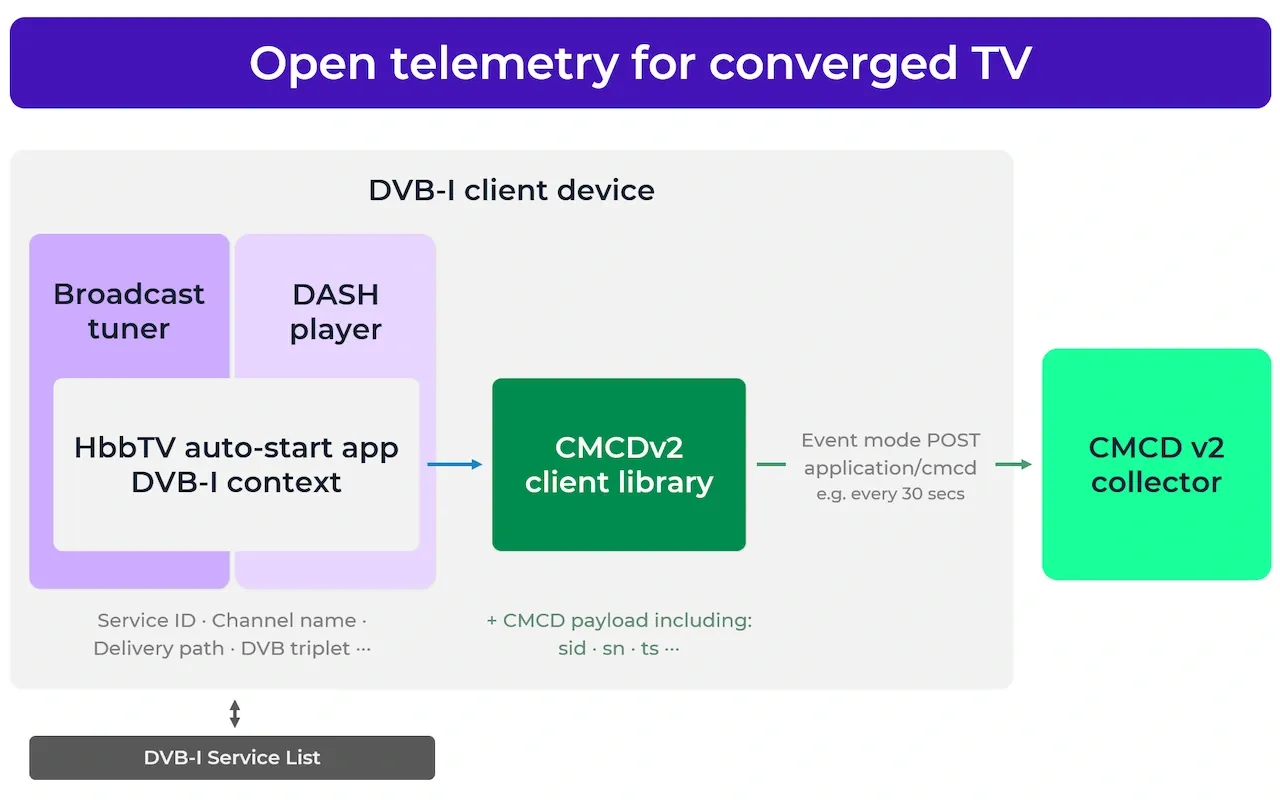
We are working on an approach based on CMCD v2, using client-to-server signalling around media delivery as the basis for DVB-I measurement. CMCD v2 adds richer reporting capabilities, including event-based reporting, while keeping the data model standardized across players and platforms.
CMCD v2 / CTA-5004-B spec: Official CTA WAVE page / Freely available non-binding HTML version
For information useful for DVB-I but not part of the core CMCD specification, we use CMCD custom keys rather than introducing a parallel format. We have also contributed to the SVTA CMCD Custom Keys Repository, providing a shared registry for those keys.
SVTA CMCD Custom Keys Registry: Repository / Current keys
Why this matters for DVB-I
Measurement needs to work across different TV manufacturers and client implementations, scale to large deployments, and ideally build on standards already supported by the streaming ecosystem.
The shared reporting format gives those implementations a common basis for the measurement approach described here. Supported keys and events still need validation on each client.
Moving towards deployment
At the time of this September 2026 announcement, we were preparing a first pilot with a major public broadcaster in the EU.
Discuss the approach
If you are working on DVB-I measurement, book a demo to discuss the available telemetry and a scoped integration.
For current reporting options and player support, read CMCD v2: The state of open streaming analytics.
For the reporting concepts, see CMCD explained; for implementation examples, use the player setup guide.